· Michele Mazzucco · Post · 11 min read
Virtual queues: the ultimate guide to skip-the-line technology in 2025
Virtual queues do more than throttle traffic. This in-depth guide explores how smart systems streamline digital access, enhance customer satisfaction, and prevent overload when demand surges.

When the queue is the experience
Every business, platform, or institution that deals with bursts of demand faces the same challenge: how to serve everyone fairly and efficiently—without crashing systems or frustrating users.
It does not matter if:
- You are launching a new product, resulting in 100,000 people trying to access your web site at the same time,
- You are managing a hospital triaging patients at reception,
- Or you are running a government office processing walk-ins,
a poorly managed queue results in lost revenue, abandoned sessions, reputational damage—and angry users.
For this reason, virtual waiting rooms have become essential infrastructure. The bad news, however, is that picking the right solution—or deciding if you need one at all—is often more complex than just throttling traffic. The tricky part is how your organization manages demand, prioritizes users, and delivers service under pressure.
Table of contents
- Controlling demand starts at the gate
- 🧰 What virtual waiting rooms actually do
- Not just for the web: physical and hybrid queues matter too
- 📊 Vendor landscape: 5 types of virtual queueing tools
- Your three options: platform, custom, or hybrid
- How to choose the right virtual waiting room solution
- Common mistakes when choosing a waiting room
- 🏷️ Use cases: queue logic isn’t one-size-fits-all
- Final thoughts
Controlling demand starts at the gate
In a previous article on congestion and capacity in supply chains, we introduced Little’s Law—a fundamental principle of queueing theory. It shows that when the rate of incoming requests exceeds your system’s processing capacity, queues grow—and wait times skyrocket.
So how do we avoid that? By controlling not just the supply of service, but also the flow of demand.
That’s where virtual waiting rooms (also known as virtual queues) come in. In order to decide whether (and how) to use them, we first need to distinguish between two fundamental system models: open vs. closed queues.
🔓 What is an open queueing system?
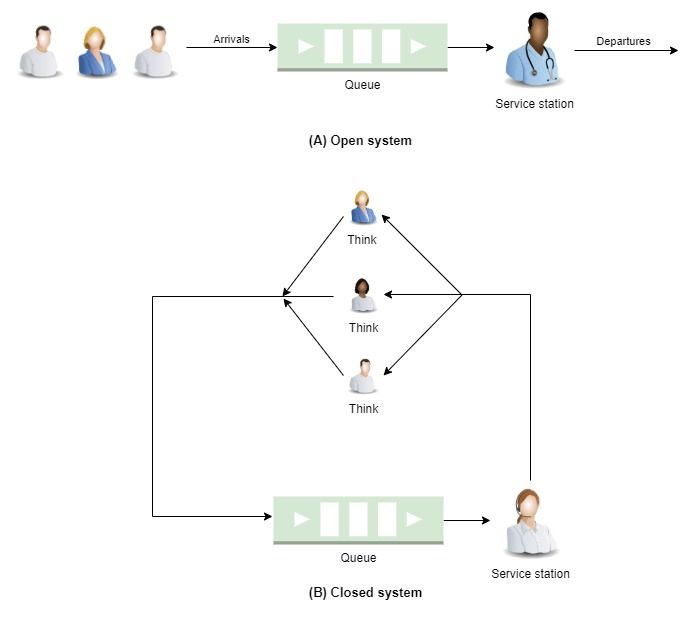
In an open queue (Figure 1A below) users arrive from the outside world, pass through one or more service points, and eventually leave.
Key traits
- Customers arrive from an external source (e.g., the internet, walk-ins)
- They visit one or more service stations (in a hospital these may be doctor, xray, surgery, or discharge)
- After being served, they leave the system
🛠️ Real-world examples
- Website visitors during a product launch
- Packets entering a network router
- People walking into a government office
📉 What happens under heavy load?
If the rate of arrivals exceeds the system’s processing capacity, the queue grows—and can grow without bound. Wait times increase, performance degrades, and eventually, the system fails to keep up.
🔒 What is a closed queueing system?
In a closed queue (Figure 1B above), the number of users is fixed. Users continuously circulate between service stations, but no one enters or leaves the system.
Key traits
- The number of users (or requests) inside the system is fixed
- Users move from one service point to another
- New user arrivals are only triggered by departing users (possibly followed by some delay, called thinking time)
🛠️ Real-world examples
- A production line with a fixed number of parts
- Simulated user workloads in performance testing
- A multi-step approval workflow with a constant pool of tasks
📈 What happens under heavy load?
Closed queueing networks exhibit a saturation effect: as demand increases (e.g., more users circulating, shorter think times), throughput rises—until the system reaches its capacity. Beyond that point, additional load leads only to increased congestion.
The key difference from open queues is that delays never grow unbounded. The total number of users is fixed, so queues stay mathematically stable—even if delays become unacceptable in practice.
⚖️ Why this matters: the case for gating
Most real-world systems experience traffic as an open queue—users arrive at unpredictable rates, often outpacing your infrastructure’s ability to respond.
In order to prevent overload, many platforms implement gating behind the scenes. Tools like HAProxy, NGINX, or Kubernetes Ingress controllers can be configured to limit concurrent sessions or connections, shielding backend services from overload. Some edge service meshes and API gateways offer rate-limiting features too.
These infrastructure-level solutions, however, operate behind the curtain. They silently drop or delay excess traffic—offering no feedback, no wait time estimates, no sense of fairness.
Virtual waiting rooms build on this same principle, but go further, making the gate visible. They provide structured inflow control and, when needed, offer a visible waiting experience—progress indicators, wait times, and fairness logic.
This transforms an open queue into a controlled, closed-loop system—one that stabilizes performance, with or without a visual queue.
🔍 Research Insight: closed systems aren’t just controlled—they’re faster and more stable
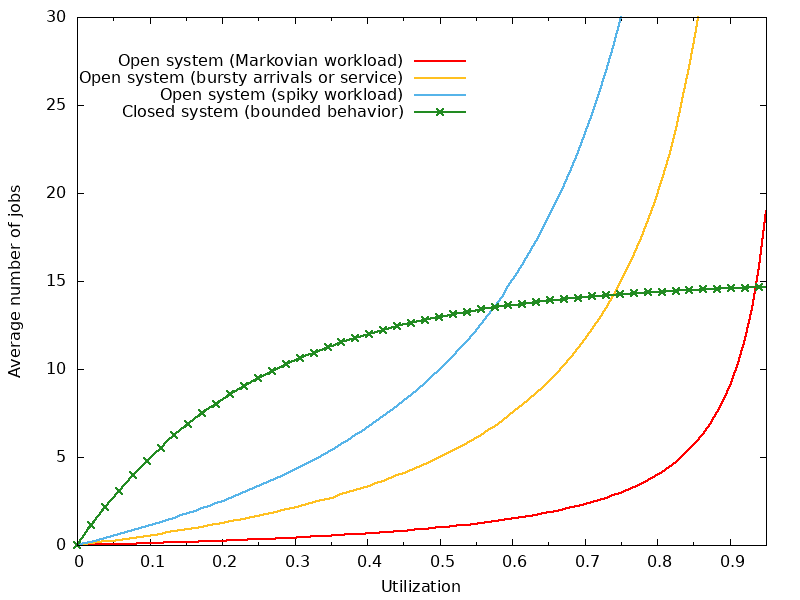
Figure 2 - Queue growth in open vs. closed systems: in open systems, queue length increases rapidly with utilization—especially under high variability. Closed systems, by contrast, bound queue size naturally, keeping performance stable even during demand surges.
Takeaway: it’s about control, not cosmetics
Virtual waiting rooms are not inherently about fairness or customer satisfaction. At their core, they are load control mechanisms—designed to stabilize system behavior when demand exceeds capacity.
Whether users see a countdown or nothing at all, the gating mechanism serves a single purpose:
To transform an unpredictable open system into a manageable, closed-loop environment.
This shift can improve throughput, reduce latency, and protect infrastructure—regardless of whether a countdown, progress bar, or branded UX is layered on top.
💡 How QueueworX helps
🧰 What virtual waiting rooms actually do
Before selecting a vendor or building in-house, it is important to understand the core functions of a virtual waiting room:
- Regulates access to high-demand pages
- Prevents server overload during traffic spikes
- Maintains fairness or custom prioritization rules
- Improves perceived experience (when done right)
- Optionally queues users before full page load (CDN or edge-level)
Some platforms simply delay traffic. Others offer full UX control, rich analytics, API integration, and branding features.
What you need depends on your infrastructure, user expectations, and how visible (or invisible) you want the queue to be.
Not just for the web: physical and hybrid queues matter too
While many associate virtual waiting rooms with websites (like Queue-it), countless real-world systems operate outside the browser:
🏛️ Government agencies: kiosks + SMS alerts reduce lobby congestion
🏥 Hospitals and clinics: mobile apps manage check-in and appointment queues
🛍️ Retail banking and stores: digital tokens for virtual lines
These systems blend physical presence and digital orchestration, and often require integration with customer messaging, backend workflows, and service differentiation policies.
📊 Vendor landscape: 5 types of virtual queueing tools
Not all virtual waiting rooms are created equal. With over a dozen commercial platforms and countless use cases, virtual waiting room solutions vary widely in features, pricing, and deployment models.
Since choosing the right solution goes far beyond simply throttling traffic, the real question is:
Which solution fits your operational model, customer experience goals, and risk profile?
That’s where vendor-neutral guidance becomes invaluable—especially when evaluating tradeoffs across pricing, integration, and performance guarantees.
The table below presents a curated selection of market leaders and notable options—but it’s far from exhaustive.
New vendors continue to emerge, and hybrid or DIY approaches are growing in popularity as well.
| Category | Examples | Strengths | Watchpoints |
|---|---|---|---|
| Web CDN/Edge-based | Cloudflare Waiting Room, Akamai | Protects origin, simple setup | Limited UX control |
| UX-first Cloud platforms | Queue-it, CrowdHandler, Queue-Fair | Visual queues, fairness, progress bars | Platform lock-in, limited logic |
| Hybrid / Physical systems | Qmatic, Wavetec, Qminder | On-site + mobile integration | Requires hardware, complex ops |
| Call center & Booking queues | GetMindful, Waitwhile | Asynchronous workflows | Niche use cases |
| Custom/In-house | — | Full control, tailored experience | High dev cost, longer timeline |
🛈 Note: The above table includes a selection of leading virtual waiting room vendors. Other solutions—such as Imperva Waiting Room or AWS’s reference implementation—may suit specific technical or cloud-native scenarios.
👉 Technical curiosity? If you are wondering how this differs from tools like HAProxy or NGINX, here’s a quick comparison: Tools like HAProxy, NGINX, or even classic reverse proxies can queue or throttle requests by limiting concurrent connections. They are great for keeping your backend infrastructure safe during spikes, but they operate purely at the transport layer. Users waiting in those queues don’t see progress indicators, estimated wait times, or personalized feedback. Virtual waiting rooms go further: In short, they don’t just protect systems—they manage expectations. And that makes all the difference when demand surges.💡 Isn’t this just a fancy load balancer?
Your three options: platform, custom, or hybrid
Once you understand what these tools do, the next question is: should you build, buy, or combine?
| Approach | Pros | Cons |
|---|---|---|
| 🧩Off-the-shelf platform | Fast to deploy, supported, user-tested | Limited flexibility, ongoing cost, vendor lock-in |
| 🛠️Custom solution | Full control, tailored to needs | Requires in-house expertise, longer implementation |
| 🔄Hybrid model | Balance of speed + control | Integration complexity, vendor coordination |
If branding, prioritization, or integration with internal systems is critical, off-the-shelf platforms may fall short.
If you need speed and simplicity, a managed service might be perfect.
💡 QueueworX helps organizations weigh these options—and build the right one.
How to choose the right virtual waiting room solution
Unfortunately selecting a virtual waiting room isn’t just about ticking feature boxes. Instead, you should make sure the platform aligns with your traffic patterns, user expectations, branding, tech stack, and budget.
Here is what to look for — based on real-world selection frameworks used by enterprises.
Traffic capacity
Can the platform handle your peak concurrent load without degrading performance? Don’t just go by marketing claims—ask for proven benchmarks, run stress tests, and request trial access if available.
Fairness and control
Do you need first-in, first-out fairness, or more flexible mechanisms like randomized queuing or priority access? If serving VIP users, early-bird promotions, or reservation codes, support for custom queue rules is crucial.
Branding and user experience
Is the waiting room customizable enough to match your visual identity? That includes logos, fonts, color schemes, messaging, language support, and even custom domains (e.g., queue.yoursite.com). During peak events, this page represents your brand.
Integration and flexibility
Will it integrate easily with your current systems? Look for:
- APIs and SDKs
- Pre-built plugins (for platforms like Shopify, Magento, etc.)
- Edge/CDN compatibility
- Deployment location (cloud-native, on-prem, hybrid)
Pricing transparency
Pricing varies widely — from flat-rate to usage-based. It is important to understand:
- How pricing scales with user volume
- What counts as a “queue event”
- Overage charges, support fees, and premium feature access
Reporting and analytics
No matter which tool you choose, it should offer:
- Real-time monitoring (active queue length, drop-off rate)
- Historical reporting (per event, per region, etc.)
- Export or integration with tools like GA4 or Mixpanel. These are essential for post-event diagnostics and future planning.
Ease of Use
Some platforms are designed for dev teams. Others are built for marketing or operations. Choose one that matches your internal skills and capacity. Bonus: evaluate vendor support quality — especially during high-stakes events.
💡 Need help selecting the right platform or building your own? QueueworX offers vendor-neutral guidance, helping you define key requirements, assess trade-offs, and select the right solution for your needs.
Common mistakes when choosing a waiting room
Organizations often treat virtual waiting rooms as a plug-and-play solution, but real-world implementation is rarely that simple.
Here is what commonly goes wrong:
❌ Choosing based on brand name, not feature fit
❌ Assuming traffic control = good UX
❌ Ignoring user psychology (progress bars, perceived fairness). As explored in our article on digital queue frustration, poor communication, lack of visibility, or perceived unfairness in queue behavior can lead to high abandonment rates—even if the system is technically working just fine.
❌ Underestimating time to integrate or configure properly
❌ Not aligning the solution with business goals can lead to hidden inefficiencies and escalating user dissatisfaction. We have explored these impacts in more detail in this article on the true cost of long wait times.
🔔 Smart queueing requires more than throttling traffic. It requires insight, planning, and the right fit — technically and strategically.
🏷️ Use cases: queue logic isn’t one-size-fits-all
Virtual waiting rooms serve vastly different industries—and what works perfectly in one setting might completely fail in another. From healthcare to e-commerce, the right queueing logic depends on your goals, users, and service model.
🎢 In the physical world, Disney’s theme parks are a great example of virtual queuing done right. Guests can reserve spots in line via mobile apps and continue enjoying other activities—turning wait time into free time.
| Use Case | Priority | UX Goal |
|---|---|---|
| Concert ticket sales | Fairness + speed | Avoid crashes, simplify checkout |
| Government services | Availability + compliance | Manage spikes, reduce frustration |
| Limited-edition drops | Brand experience + control | Avoid bots, reward loyalty |
| Online registration | Predictability | Smooth enrollment window |
Final thoughts

Choosing a virtual waiting room is not just an infrastructure decision—it’s a business decision.
- Get it right, and you control traffic, preserve brand trust, and convert more users.
- Get it wrong, and you frustrate customers, waste resources, and lose revenue.
📬 Get weekly queue insights
Not ready to talk? Stay in the loop with our weekly newsletter — The Queue Report, covering intelligent queue management, digital flow, and operational optimization.